Python 自动化实战:定时任务 & 监控脚本
你写的那堆脚本还活着吗?
回顾一下前面四篇文章你写了什么:
- 第一篇:10 个日常自动化脚本——文件整理、批量改名、邮件发送
- 第二篇:GitHub Trending 爬虫 + 价格监控器
- 第三篇:调用 50+ 免费 API 拉数据
- 第四篇:Pandas 数据分析模板,自动出报表
现在我问你一个扎心的问题:这些脚本,你现在还在跑吗?
我自己的教训是这样的:写完前三篇的脚本后,我把它们扔在服务器上,手动跑了两次,觉得效果不错。然后一个月没碰。等我想起来再跑一次,发现爬虫脚本因为目标网站改版挂了,API key 过期了,数据分析脚本拉到的 CSV 还是一个月前的。
脚本不自动跑,等于没写。
这不是鸡汤,是实打实的时间账。你花 2 小时写了个竞品价格监控器,然后每次都手动 python monitor.py,两个月跑了 3 次——平摊下来每次花费 40 分钟。如果写成 Cron 任务每小时自动跑一次,它在一个月内替你执行了 720 次检查。成本摊到每次检查,几乎为零。
这篇文章就是解决这个问题的。我会把你前面的所有脚本串起来,配上系统监控和异常告警,搭一个完整的自动化流水线。
自动化调度架构
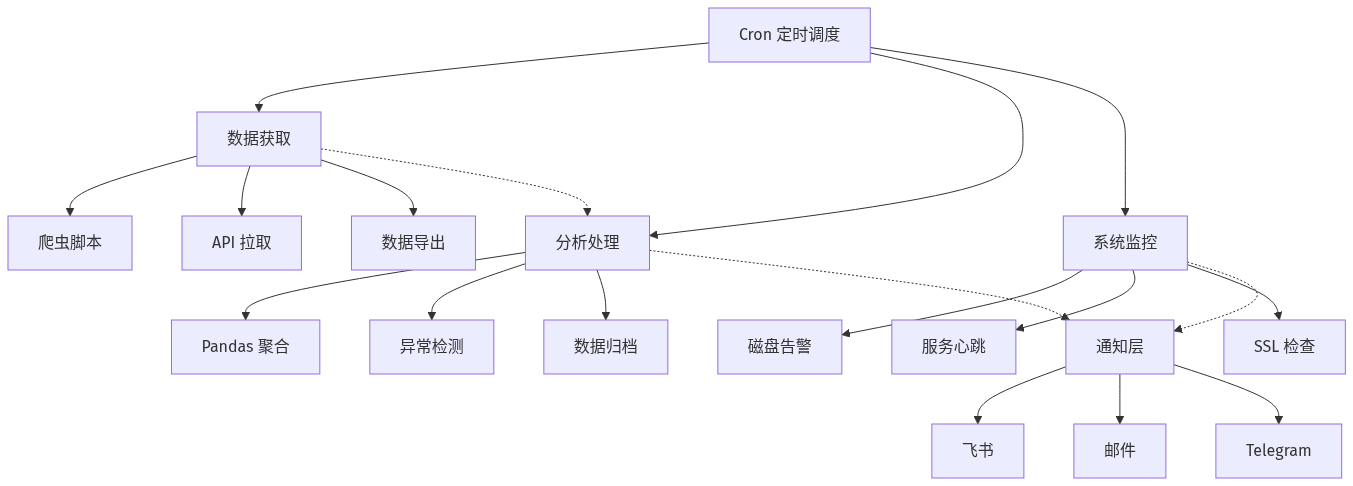
整套架构分四层:数据获取层负责拉数据(爬虫、API、数据库导出),分析处理层负责把原始数据变成洞察(Pandas 聚合、异常检测),系统监控层保证服务器本身不出问题(磁盘、服务、SSL),通知层负责在你需要知道的时候把消息推到你的手机上。
Cron 是所有层的总调度器——它会按你设的时间表,准时把每一层的脚本叫起来干活。
Cron 基础:别怕,五分钟学会
很多人听到 Cron 就觉得是运维的活。其实它简单到可笑——就一个文本文件,每行一条规则。
# 编辑你的 crontab
crontab -e

# 格式:分 时 日 月 星期 命令
# ┌──── 分钟 (0-59)
# │ ┌──── 小时 (0-23)
# │ │ ┌──── 日期 (1-31)
# │ │ │ ┌──── 月份 (1-12)
# │ │ │ │ ┌──── 星期 (0=周日, 6=周六)
# │ │ │ │ │
# * * * * * 要执行的命令
五个时间字段加一个命令。下面是最常用的几种写法:
# 每天早上 8 点跑一次
0 8 * * * /usr/bin/python3 /home/ubuntu/scripts/daily_report.py

# 每小时跑一次(在整点)
0 * * * * /usr/bin/python3 /home/ubuntu/scripts/check_prices.py

# 每 30 分钟跑一次
*/30 * * * * /usr/bin/python3 /home/ubuntu/scripts/heartbeat.py

# 每周一早上 9 点
0 9 * * 1 /usr/bin/python3 /home/ubuntu/scripts/weekly_analysis.py

# 每月 1 号凌晨 2 点
0 2 1 * * /usr/bin/python3 /home/ubuntu/scripts/monthly_cleanup.py
几个关键点:
一定要写绝对路径。python3 不行,写 /usr/bin/python3。脚本路径也一样,Cron 的环境变量和你登录 shell 不一样,~ 和相对路径都不可靠。
Cron 不会帮你管理虚拟环境。如果你用 venv,要显式指定解释器路径:
0 8 * * * /home/ubuntu/venv/bin/python /home/ubuntu/scripts/daily_report.py
或者用个 shell 包装脚本,先 source venv/bin/activate 再跑 Python。我个人偏好前者——少一层中间文件,出问题更容易定位。
Cron 日志去哪了? Cron 默认把 stdout/stderr 发邮件给当前用户。如果你没配邮件服务(大部分 VPS 默认没配),这些输出就丢了。最简单的做法是手动重定向:
0 8 * * * /usr/bin/python3 /home/ubuntu/scripts/daily_report.py >> /var/log/cron-daily.log 2>&1
但是这样日志会无限膨胀。更好的方案后面会说。
场景一:把爬虫变成定时任务
第二篇文章写了两个爬虫——GitHub Trending 抓取器和价格监控器。价格监控器里有个 while True 循环自己靠 time.sleep() 保持运行。这种方式有两个问题:
- 脚本挂了就彻底停了,没有人会重启它
while True+sleep(3600)太粗糙,你想改间隔还得改代码
正确的做法:把循环去掉,每次跑一次检查,让 Cron 来控制节奏。
#!/usr/bin/env python3
"""price_check.py —— 由 Cron 每小时调用一次"""
import requests
from bs4 import BeautifulSoup
import sys
import json
from pathlib import Path
from datetime import datetime

URL = "https://example.com/product-page"
STATE_FILE = Path("/home/ubuntu/data/last_price.json")
LOG_FILE = Path("/var/log/price_check.log")

def log(msg: str):
    timestamp = datetime.now().strftime("%Y-%m-%d %H:%M:%S")
    with open(LOG_FILE, "a") as f:
        f.write(f"[{timestamp}] {msg}\n")
    print(msg)

def get_price():
    headers = {
        "User-Agent": "Mozilla/5.0 (Windows NT 10.0; Win64; x64) "
                      "AppleWebKit/537.36 (KHTML, like Gecko) "
                      "Chrome/120.0.0.0 Safari/537.36"
    }
    resp = requests.get(URL, headers=headers, timeout=15)
    soup = BeautifulSoup(resp.text, "lxml")
    price_tag = soup.find("span", class_="price")
    if not price_tag:
        raise ValueError("未找到价格元素")
    price_text = price_tag.get_text(strip=True).replace("¥", "").replace(",", "").replace(" ", "")
    return float(price_text)

def notify_change(old: float, new: float):
    # 直接调飞书的 Webhook(比 SMTP 邮件快得多,也更可靠)
    webhook_url = "https://open.feishu.cn/open-apis/bot/v2/hook/xxx"
    msg = {
        "msg_type": "text",
        "content": {"text": f"📉 价格变动: ¥{old} → ¥{new}\n{URL}"}
    }
    requests.post(webhook_url, json=msg, timeout=10)

def main():
    try:
        current_price = get_price()
        log(f"当前价格: ¥{current_price}")

        if STATE_FILE.exists():
            last_data = json.loads(STATE_FILE.read_text())
            last_price = last_data["price"]

            if current_price != last_price:
                notify_change(last_price, current_price)
                log(f"价格变动: ¥{last_price} → ¥{current_price}")

        STATE_FILE.write_text(json.dumps({
            "price": current_price,
            "checked_at": datetime.now().isoformat()
        }))
    except Exception as e:
        log(f"检查失败: {e}")
        sys.exit(1)

if __name__ == "__main__":
    main()
关键改动:
状态持久化到文件。每次跑完把当前价格写到
last_price.json,下次跑的时候读出来比较。这比依赖进程内变量可靠一万倍——脚本重启、机器重启都不丢状态。异常退出码。
sys.exit(1)让 Cron 知道这次执行失败了。配合后面的监控方案,你会在失败时收到告警。飞书 Webhook 代替 SMTP 邮件。Webhook 比 SMTP 快,不需要配邮件服务,而且消息直接推到手机。飞书、企业微信、钉钉都支持 Incoming Webhook,注册一个 bot 就能拿 URL。
Cron 配置:
# 每小时检查一次价格
0 * * * * /usr/bin/python3 /home/ubuntu/scripts/price_check.py
场景二:数据分析定期产出
第四篇文章写了 Pandas 分析模板。现在让它每周自动跑一次,产出报告。
#!/usr/bin/env python3
"""weekly_analysis.py —— 每周一早上自动跑"""
import pandas as pd
import matplotlib.pyplot as plt
import requests
import json
from datetime import datetime, timedelta
from pathlib import Path

plt.rcParams['font.sans-serif'] = ['Noto Sans CJK SC']
plt.rcParams['axes.unicode_minus'] = False

OUTPUT_DIR = Path("/home/ubuntu/reports")
OUTPUT_DIR.mkdir(exist_ok=True)

def pull_data_from_db():
    """从 SQLite 拉取最近 7 天的用户行为数据"""
    import sqlite3
    conn = sqlite3.connect("/home/ubuntu/data/app_events.db")
    query = """
        SELECT user_id, event, date, duration_sec
        FROM user_events
        WHERE date >= date('now', '-7 days')
    """
    df = pd.read_sql(query, conn)
    conn.close()
    return df

def analyze(df: pd.DataFrame):
    df['date'] = pd.to_datetime(df['date'])

    # 每日活跃用户
    dau = df.groupby('date')['user_id'].nunique()

    # 事件分布
    event_counts = df.groupby('event').size().sort_values(ascending=False)

    # 用户留存
    user_days = df.groupby('user_id')['date'].nunique()
    retention = (user_days >= 3).mean() * 100  # 3日留存

    return dau, event_counts, retention

def plot_and_save(dau, event_counts):
    """生成 PNG 图表"""
    fig, axes = plt.subplots(1, 2, figsize=(14, 5))

    dau.plot(ax=axes[0], marker='o', color='#4A90D9')
    axes[0].set_title('过去7天 DAU')
    axes[0].set_ylabel('活跃用户数')

    event_counts.plot(kind='barh', ax=axes[1], color='#E85D3F')
    axes[1].set_title('事件分布')

    plt.tight_layout()
    chart_path = OUTPUT_DIR / f"weekly_report_{datetime.now().strftime('%Y%W')}.png"
    plt.savefig(chart_path, dpi=150)
    return chart_path

def push_to_feishu(chart_path, dau, retention):
    """把图表和关键指标推到飞书"""
    today = datetime.now().strftime("%m月%d日")
    avg_dau = dau.mean()

    # 先发文本指标
    webhook = "https://open.feishu.cn/open-apis/bot/v2/hook/xxx"
    msg = {
        "msg_type": "interactive",
        "card": {
            "header": {"title": {"content": f"📊 周报 {today}", "tag": "plain_text"}},
            "elements": [
                {"tag": "div", "text": {"content": f"平均 DAU:**{avg_dau:.0f}**\n3日留存:**{retention:.1f}%**", "tag": "lark_md"}},
                {"tag": "img", "img_key": "NEED_UPLOAD_FIRST", "alt": {"content": "周趋势图", "tag": "plain_text"}}
            ]
        }
    }
    requests.post(webhook, json=msg, timeout=10)

def main():
    df = pull_data_from_db()
    dau, event_counts, retention = analyze(df)
    chart_path = plot_and_save(dau, event_counts)
    push_to_feishu(chart_path, dau, retention)
    print(f"周报已生成: {chart_path}")

if __name__ == "__main__":
    main()
Cron 配置:
# 每周一早上 8 点跑周报
0 8 * * 1 /usr/bin/python3 /home/ubuntu/scripts/weekly_analysis.py
这里有一个实际经验:飞书卡片消息内嵌图片需要先上传图片获取 image_key。上面代码里我写了 "NEED_UPLOAD_FIRST" 占位,生产代码需要调用飞书的图片上传 API。如果嫌麻烦,最简单的方式是用飞书文本消息只发数据指标,图存在服务器上你手动看,或者用 Telegram Bot——Telegram 可以直接通过 sendPhoto 接口传本地文件,不需要预上传。
# Telegram 发图片——比飞书省一步
def push_to_telegram(chart_path, text):
    bot_token = "YOUR_BOT_TOKEN"
    chat_id = "YOUR_CHAT_ID"

    # 发文字
    requests.post(
        f"https://api.telegram.org/bot{bot_token}/sendMessage",
        json={"chat_id": chat_id, "text": text}
    )
    # 直接发图
    with open(chart_path, "rb") as f:
        requests.post(
            f"https://api.telegram.org/bot{bot_token}/sendPhoto",
            data={"chat_id": chat_id},
            files={"photo": f}
        )
场景三:系统监控——你的服务器还活着吗?
前面讲的都是业务脚本。但还有一个问题:就算脚本写对了、Cron 配对了,服务器挂了就全完蛋。你需要几个最基础的监控脚本。
磁盘使用率告警
最常见的翻车场景:爬虫跑了几周,存了一堆数据,磁盘满了。SQLite 写入失败、日志写不进去,你完全不知道,直到某天用户说功能坏了。
#!/usr/bin/env python3
"""disk_monitor.py —— 每小时检查磁盘"""
import shutil
import requests
import sys

THRESHOLD = 80  # 超过 80% 就告警

def check_and_alert():
    usage = shutil.disk_usage("/")
    used_pct = (usage.used / usage.total) * 100

    if used_pct > THRESHOLD:
        webhook = "https://open.feishu.cn/open-apis/bot/v2/hook/xxx"
        msg = {
            "msg_type": "text",
            "content": {
                "text": (
                    f"🚨 磁盘告警\n"
                    f"使用率:{used_pct:.1f}%(阈值 {THRESHOLD}%)\n"
                    f"已用:{usage.used // (1024**3)}GB / {usage.total // (1024**3)}GB\n"
                    f"主机:price-monitor-server"
                )
            }
        }
        requests.post(webhook, json=msg, timeout=10)
        return False
    return True

if __name__ == "__main__":
    ok = check_and_alert()
    if not ok:
        print(f"磁盘使用率超过 {THRESHOLD}%")
    sys.exit(0 if ok else 1)
服务健康检查
如果你还跑了 Web 服务(比如 Flask API、爬虫管理面板),需要确认它还活着:
#!/usr/bin/env python3
"""health_check.py —— 每5分钟检查服务是否响应"""
import requests
import sys
import time

SERVICES = [
    {"name": "API 服务", "url": "http://localhost:5000/health"},
    {"name": "爬虫面板", "url": "http://localhost:8080/ping"},
]

def check_services():
    all_ok = True
    for svc in SERVICES:
        try:
            r = requests.get(svc["url"], timeout=5)
            if r.status_code != 200:
                print(f"❌ {svc['name']} 返回 {r.status_code}")
                all_ok = False
            else:
                print(f"✅ {svc['name']} OK")
        except Exception as e:
            print(f"❌ {svc['name']} 不可达: {e}")
            all_ok = False
    return all_ok

if __name__ == "__main__":
    ok = check_services()
    sys.exit(0 if ok else 1)
SSL 证书到期检查
如果你的产品有自己的域名,证书到期后用户访问会看到安全警告——这对独立产品的转化是致命的。
#!/usr/bin/env python3
"""ssl_check.py —— 每天检查 SSL 证书到期日"""
import ssl
import socket
from datetime import datetime, timedelta
import requests
import sys

DOMAINS = ["zhouyang.dev", "your-product.com"]
WARN_DAYS = 30

def get_cert_expiry(domain: str):
    ctx = ssl.create_default_context()
    with ctx.wrap_socket(socket.socket(), server_hostname=domain) as s:
        s.settimeout(10)
        s.connect((domain, 443))
        cert = s.getpeercert()
        expiry_str = cert['notAfter']
        # 'Jun 26 23:59:59 2026 GMT' → datetime
        return datetime.strptime(expiry_str, "%b %d %H:%M:%S %Y %Z")

def main():
    alerts = []
    for domain in DOMAINS:
        try:
            expiry = get_cert_expiry(domain)
            days_left = (expiry - datetime.now()).days
            print(f"{domain}: {days_left} 天后到期 ({expiry.date()})")
            if days_left <= WARN_DAYS:
                alerts.append(f"⚠️ {domain} 证书 {days_left} 天后到期")
        except Exception as e:
            alerts.append(f"❌ {domain} 证书检查失败: {e}")

    if alerts:
        webhook = "https://open.feishu.cn/open-apis/bot/v2/hook/xxx"
        requests.post(webhook, json={
            "msg_type": "text",
            "content": {"text": "🔒 SSL 证书提醒\n" + "\n".join(alerts)}
        }, timeout=10)
        sys.exit(1)

if __name__ == "__main__":
    main()
Cron 配置汇总:
# 系统监控
0 * * * * /usr/bin/python3 /home/ubuntu/scripts/disk_monitor.py
*/5 * * * * /usr/bin/python3 /home/ubuntu/scripts/health_check.py
0 9 * * * /usr/bin/python3 /home/ubuntu/scripts/ssl_check.py

# 业务脚本
0 * * * * /usr/bin/python3 /home/ubuntu/scripts/price_check.py
0 8 * * 1 /usr/bin/python3 /home/ubuntu/scripts/weekly_analysis.py
0 6 * * * /usr/bin/python3 /home/ubuntu/scripts/github_trending.py
最佳实践:三个要命的问题
写了 5 篇自动化文章,我发现有三个问题如果不提前处理,会在你上线两三周后集中爆发。
1. 日志管理
每个脚本都往日志文件追加,几周后你能收获一个 2GB 的纯文本文件。用 logrotate 解决:
# /etc/logrotate.d/python-cron
/var/log/cron-*.log {
    daily               # 每天转储一次
    rotate 14           # 保留 14 天
    compress            # 压缩旧日志
    delaycompress       # 延迟一天再压缩
    missingok           # 文件不存在不报错
    notifempty          # 空文件不转储
    copytruncate        # 复制后清空(不中断正在写入的进程)
}
然后统一日志格式:
import logging

logging.basicConfig(
    filename='/var/log/cron-price_check.log',
    level=logging.INFO,
    format='%(asctime)s [%(levelname)s] %(message)s',
    datefmt='%Y-%m-%d %H:%M:%S'
)

logger = logging.getLogger(__name__)
logger.info(f"价格检查完成: ¥{current_price}")
2. 告警风暴
凌晨三点磁盘满了一次,你的飞书就收到一条告警。但如果脚本有问题,每次跑都失败,你会在一小时内收到 60 条同样的消息。这叫告警风暴——我亲身经历过,手机直接被震到没电。
解法是加简单的去重:
import hashlib
from pathlib import Path

def should_alert(message: str, cooldown_minutes: int = 60) -> bool:
    """相同消息在 cooldown 时间内不重复发送"""
    alert_dir = Path("/tmp/alerts_sent")
    alert_dir.mkdir(exist_ok=True)

    msg_hash = hashlib.md5(message.encode()).hexdigest()
    alert_file = alert_dir / msg_hash

    if alert_file.exists():
        mtime = alert_file.stat().st_mtime
        if time.time() - mtime < cooldown_minutes * 60:
            return False  # 冷却期内,跳过

    alert_file.touch()
    return True

# 使用
msg = f"磁盘使用率 {used_pct:.1f}%"
if should_alert(msg, cooldown_minutes=60):
    send_notification(msg)
3. Cron 任务互相踩踏
如果你的数据分析脚本要跑 10 分钟,但 Cron 每小时跑一次——没问题,它们不会重叠。除非你设了 */5 * * * *,脚本却要跑 10 分钟。这时新的实例会启动,和旧实例一起跑,两份分析结果互相覆盖。
用文件锁防止重叠执行:
import fcntl
import sys

def acquire_lock():
    """确保同一时间只有一个实例在跑"""
    lock_file = open("/tmp/weekly_analysis.lock", "w")
    try:
        fcntl.flock(lock_file, fcntl.LOCK_EX | fcntl.LOCK_NB)
        return lock_file
    except BlockingIOError:
        print("上一个实例还在跑,跳过本次执行")
        sys.exit(0)

# 脚本开头
lock = acquire_lock()
# ... 业务逻辑 ...
fcntl.LOCK_NB 是非阻塞锁——如果拿不到锁就立刻退出,不做任何事,等 Cron 下一次调度。
从这里开始
这篇文章是整个 Python 自动化系列的终点。回顾一下你学到了什么:
| 篇目 | 能力 | 你能做什么 |
|---|---|---|
| 01 日常任务 | 文件系统操作 | 批量改名、整理文件、自动发邮件 |
| 02 Web Scraping | 数据获取 | 爬公开网页、价格监控、信息聚合 |
| 03 API 自动化 | 结构化数据 | 调用 50+ 免费 API,接入外部数据源 |
| 04 Pandas 分析 | 数据洞察 | 用户行为分析、趋势图、留存报表 |
| 05 定时调度 | 自动化运行 | 让上面所有脚本定时跑,配上监控告警 |
五篇文章串起来就是一条完整的自动化流水线:获取数据 → 分析数据 → 产出洞察 → 推送通知。你现在有模板和工具,差的只是找到一个你想持续追踪的数据源。
今天建议做的事:从你之前写的脚本里挑一个最有价值的(比如价格监控、数据分析),按这篇文章的方式改写成无状态单次执行脚本,配到 Cron 里,让它明天早上自己跑一次。看着飞书/Telegram 弹出第一条自动化消息的时候,你会感谢自己花了一个小时做这件事的。
系列导航:01 日常任务自动化 | 02 Web Scraping 实战 | 03 API 自动化 | 04 数据分析自动化 | 05 定时任务 & 监控
Python 自动化实战系列完结。下一篇系列预告:AI 编程工具链——Prompt Engineering 实战手册。
💬 Comments